The PlayStation 2 as the screen and the controller of your PC.
How to set it up, from an empty USB stick to a game on the TV. It takes about ten minutes.
Download
What you need
| A PS2 that runs homebrew | From a USB stick, with FreeMcBoot or similar. It needs a network port: every slim has one, a fat needs the network adapter. |
| A TV that takes 720p | From the PS2: a component cable, or a component to HDMI adapter. Link only outputs 1280×720. |
| A network cable | From the PS2 to your router. The PC should be on a cable too; on Wi-Fi it works with more stutter. |
| A Windows 10 or 11 PC | On the same network. By default it captures and encodes on an Intel graphics chip (Quick Sync); without one, see chapter 7. |
The USB stick
Copy what is inside the zip's PS2 folder to the root of a FAT32 stick:
USB root
├── APPS/Link/link.elf     the program
├── APPS/Link/title.cfg    its name, for launchers that list APPS/
└── nuld/config.ini        where your PC is
The PS2 has to know your PC's address. On the PC, open a terminal, type ipconfig and read the "IPv4 Address" (like 192.168.1.23). Open nuld/config.ini with Notepad and put it after servidor =.
[red]
ip = dhcp

[link]
servidor = 192.168.1.23   ; your PC's address, not a name
directo = 0               ; 1: straight to the desktop, the menu only after it ends
If you already use the NULD launcher, keep its own nuld/config.ini and add the [link] section to it.
The PC, once
- Python 3, from python.org. Tick "Add python.exe to PATH" in the installer's first window.
- ffmpeg. In a terminal:
winget install Gyan.FFmpeg, then close the terminal and open it again. - ViGEmBus, the virtual controller driver, from its releases page. It is what turns the PS2 controller into an Xbox 360 controller on the PC.
- Double-click
PC\install-packages.bat: it installs the Python packages (vgamepad, soundcard, numpy, pillow).
Playing
On the PC, double-click PC\start.bat and leave its window open. The first time, Windows asks about the firewall: allow Python on private networks.
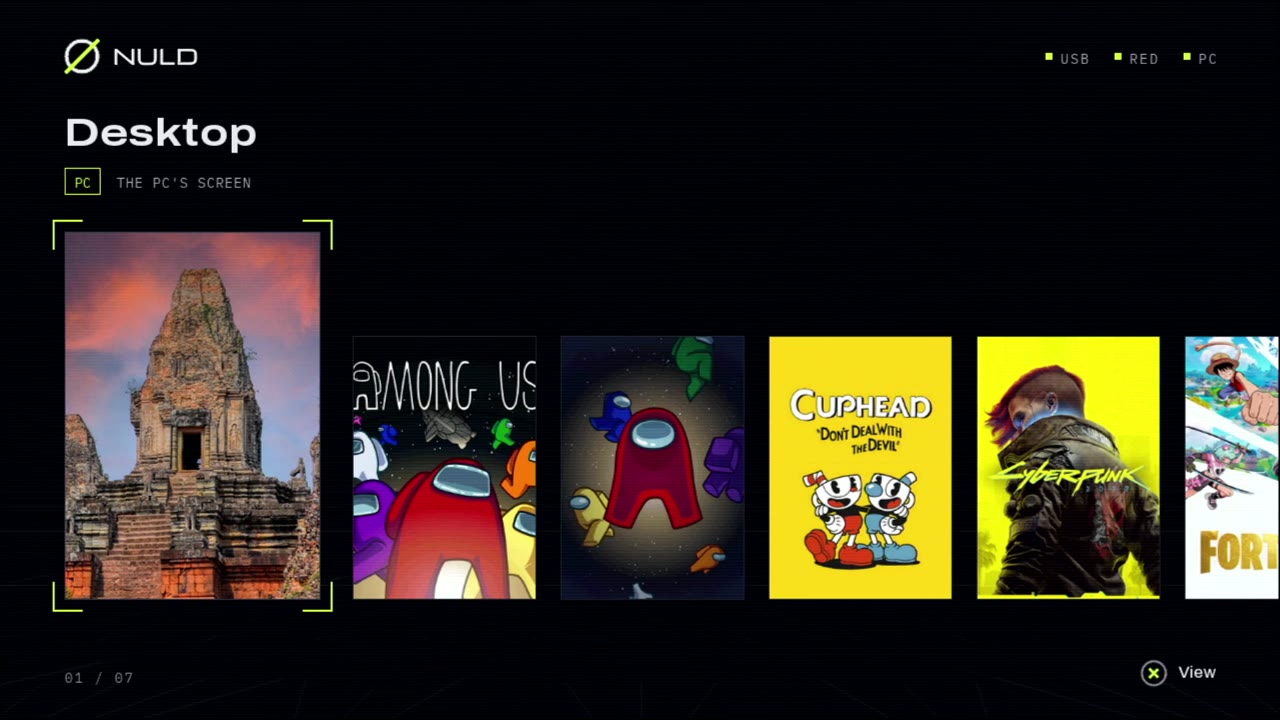
On the PS2, run mass0:/APPS/Link/link.elf: from the NULD launcher's APPS list, or with uLaunchELF. The menu shows what the PC has:
| Desktop | The PC's screen as it is. Start anything on the PC and play it from the PS2. |
| EPIC, STEAM | The games installed on the PC from those launchers. |
| GFN | Your GeForce NOW library. Open the GeForce NOW app on the PC once, so it knows your library; games you add later appear after you open it again. |
Pick one with the d-pad and press ✕: it starts on the PC, comes to the front, and its picture and sound arrive on the TV. Put the TV in game mode: its own processing is most of the delay.
Buttons
| In the menu | D-pad left and right: choose. ✕: start. |
| While playing | Everything goes to the PC as an Xbox 360 controller: ✕ A, ○ B, □ X, △ Y, L1/R1 the shoulders, L2/R2 the triggers, SELECT Back, START Start, both sticks with L3/R3, and the d-pad. |
| L1+L2+R1+R2 + △ | Back to the menu. |
| L1+L2+R1+R2 + START | Leave Link. |
How it works
The PC captures its screen, scales it to 1280×720 and encodes it as MPEG-2 on the graphics chip. Each picture is repacked, as it leaves the encoder, into PS2V: a format made for the PS2's video chip, from nuld-av. It goes out at once by UDP, and what gets lost is sent again.
On the PS2 the stream is taken straight from the Ethernet driver, decoded by the console's video chip in 8 to 19 ms a picture, and shown as soon as it is ready. The controller goes the other way, 60 times a second.
If the PS2 falls two thirds of a second behind, the PC drops what is waiting and starts the capture again: a jolt, instead of a delay that grows. If no picture arrives for 10 seconds, the PS2 goes back to its menu.
The server's options
Add them after start.bat in a terminal.
--grab gdigrab --encoder mpeg2video | Without Intel graphics: capture and encoding on the processor. It needs a fast one. |
--rate 16M | More bits for the picture (the default is 12M; the PS2's network takes about 20M). |
--title "Window name" | One window instead of the whole desktop (with --grab gdigrab). |
--no-audio | Picture only. |
Troubleshooting
- "Waiting for the PC": the address in
config.iniis not the PC's,start.batis not running, or the firewall blocked Python (allow python.exe on private networks). - Picture, but the controller does nothing: ViGEmBus is not installed, or
install-packages.batfailed. - No sound: run
install-packages.batagain; the sound needs its "soundcard" package. - Stutter with a heavy game: the PC is busy running it. Cap the game at 30 frames per second, and put the PC on a network cable.
- A game opens the Microsoft Store asking for "ms-gamingoverlay": Windows is calling the Xbox Game Bar and it is not installed. Turn off Game Bar's recording in Windows' settings.
- A black or frozen picture when a game starts: use borderless full screen in the game instead of exclusive full screen.
- Logs: the PS2 writes
mass0:/link.txt; the PC's window says what it is doing.